GraphKit
Blastframe’s GraphKit Add-on is an essential tool for animating in Blender! With 17 powerful features saving you loads of steps, it is guaranteed to become an integral part of your animation workflow.
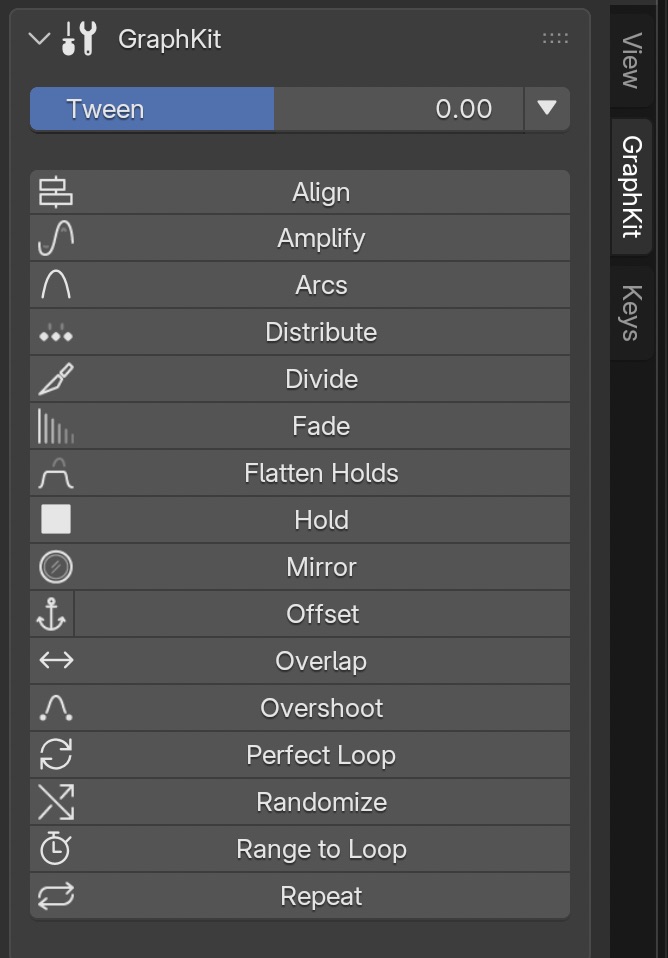
The features are:
- Align – a feature for arranging selected F-Curves in a straight line.
- Amplify – a feature for adjusting the intensity of your animations.
- Arcs – creates smooth, coordinated arcing motion from two selected F-Curves
- Distribute – a command for creating even timing between keyframes.
- Divide– subdivide and add hold frames to your F-Curves.
- Fade – for fading in and out animations using standard ease functions
- Flatten Holds – flatten just the hold keyframes in an F-Curve
- Hold – applies hold frames to selected keyframes
- Mirror – mirror selected keyframes horizontally around the playhead
- Offset – offset selected F-Curves or keyframes by the value change of an anchor keyframe
- Overlap – overlap your F-Curves without needing to extend their length
- Overshoots – insert anticipation and overshoot keyframes between each keyframe pair
- Perfect Loop – match your loop’s start & end frames perfectly
- Randomize – a polishing tool for giving organic randomness to animation loops
- Range to Loop – Set your scene’s Preview and/or Frame Range to a multiple of your loop’s length for seamless playback
- Repeat – for looping entire F-Curves or selected keyframes simultaneously.
- Tween – a simple, easy-to-use slider for creating anticipation, breakdowns, and overshoots.
Create new Tween keyframes using different Blend types (‘Breakdown’, ‘Blend to Neighbor,’ and ‘Blend to Default’) and a dial of preset percentage amounts.

In addition to these core features, GraphKit now offers many selection modes:

- Select All by Object Type – Effortlessly select F-Curves based on the type of objects they animate.
- Solo All by Object Type – Only show F-Curves based on the type of objects they animate.
- Select F-Curves by Left/Right Side – Choose F-Curves based on their side, perfect for intricate character animations.
- Select Random F-Curves – Experience a burst of creativity with GraphKit’s random F-Curve selection, allowing unexpected animation outcomes.
- Select Objects/Pose Bones from Selected F-Curves – Select objects or bones directly from F-Curves, eliminating guesswork and streamlining animation adjustments.

You can also toggle F-Curve channels with the click of one button!
- Mute All F-Curves – Disable all animation channels with a single click.
- Lock All F-Curves – Ensure your animation stays on track by locking F-curves in place, preventing accidental modifications and maintaining consistency.
- Hide All F-Curves – Keep your workspace clean and focused by toggling the visibility of F-curves, reducing clutter and streamlining your editing process.
- Toggle All Modifiers – Gain control over your animation’s behavior by easily enabling or disabling modifiers, fine-tuning their effects to suit your creative vision.
- Toggle All Pins – Maintain precise control over your animation curves with the ability to toggle pins, ensuring keyframes stay firmly in place or allowing for subtle adjustments as needed.
 |
Included in the Ultimate Animators Bundle! |
$49.99
CompatibilityBlender 2.8+


