AnimCopy
AnimCopy (formerly Copy Timing & Ease) gives Blender’s animation workflow the same one‑click “copy‑to‑selected” super‑power you already enjoy for modifiers, materials, and constraints. Stop manually duplicating curves and start animating faster!

Copy Animation to Selected
Copy Animation to Selected
Select the targets, Shift‑click the animated source, then right‑click → AnimCopy › Copy Animation to Selected. In the Redo Panel you can refine exactly what gets copied:
- Target — All curves, only transforms, only selected curves, or just selected keyframes.
- Shared Action (New Slot) — On Blender 4.4+ you can share one Action between many objects. Each target gets its own named Action Slot inside the shared Action—no more duplicate data‑blocks!
- Copy Modifiers • Copy Mode (Replace / Add) • Frame Offset • Remap XYZ • Paste Extrapolation — Fine‑tune how curves transfer and line up in time or space.
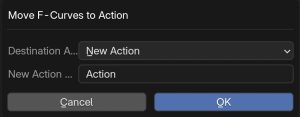
Move F‑Curves to Action
Need to break a complex rig into reusable clips for the NLA Editor? Move to Action does it in a single click:
- Destination Action — Choose an existing Action or create a brand‑new one.
- Slotted Smartness — On Blender 4.3+ the operator automatically creates (or re‑uses) an Action Slot that matches your object, so the curves stay correctly bound. On legacy < 4.3 files it falls back to the classic Action system.
- Perfect Preservation — Every keyframe, handle, easing, modifier, and group transfers intact. Source curves are removed, leaving your original Action clean.
This is invaluable for:
- Organising cluttered scene files into tidy, clearly named Actions.
- Preparing short clips (walk, run, blink) you can blend in the NLA without copy‑and‑paste tedium.
- Storing FX curves (camera shake, material tweaks) in their own Action so you can toggle or time‑offset them anywhere.
Copy Timing & Ease
If you only need the feel of the animation—its rhythm and easing—AnimCopy lets you copy just the timing or handle shapes and paste them onto any other F‑Curve, even with mismatched key counts.
Why AnimCopy?
- Precise — Copies every curve detail (or only what you ask for).
- Fast — Zero manual rebinding. One right‑click does the job.
- Future‑Proof — Fully supports Blender 4.4’s new Action Slots while remaining compatible with legacy 4.2 files.
 |
AnimCopy is included in the Ultimate Animators Bundle! |
AnimCopy: copy, move, and organise your animations with precision and speed—so you can focus on bringing your stories to life.
$19.99